A design picker for coding agents
Every agent‑built site looks the same. Yours won’t.
Your agent opens a picker mid-task. You choose a real design system from 174 styles, then palette, type and layout. It builds exactly that, not the default.
npx slopless installFree. No sign-in. 25 hand-built base styles. Works with Claude Code, Codex, Cursor and any MCP client.
Before / after
Same brief. Two agents.
“Build a website for my bakery, Crumb & Co.” One agent went with its defaults. The other opened the picker first.
- Without: centred hero, purple gradient, a pill badge, three emoji cards. You have seen it a thousand times.
- With: the style’s own grid, type pairing, palette rule and section patterns, written down as a spec the agent follows literally.
How it works
Five steps, one conversation.
The agent and the browser never talk to each other. You carry one short code between them, and it holds the whole design.
- Install the skillOne command adds the skill and our MCP server to your agent.
- Agent opens the pickerAsk for a website. Before writing code, the agent hands you a picker link.
- PickStyle, palette, type, layout, stack and SEO, with a live preview of your site.
- Paste the codeOne line, like sd1.Kx9fQ2…, back into the chat. It holds every choice.
- Agent buildsIt expands the code into DESIGN.md, tokens.json and layout.json, then builds to spec.
Style gallery
25 styles. Not themes.
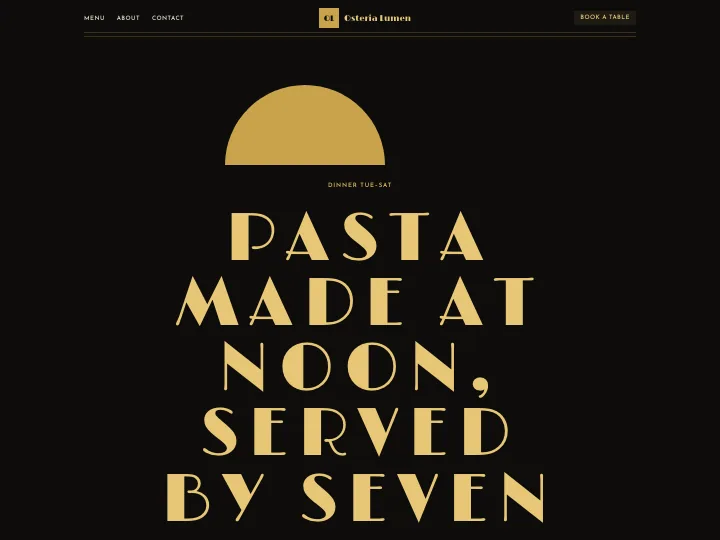
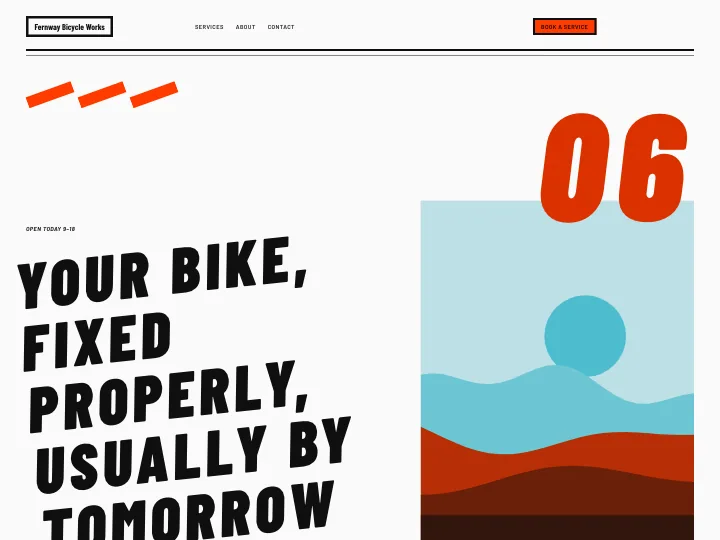
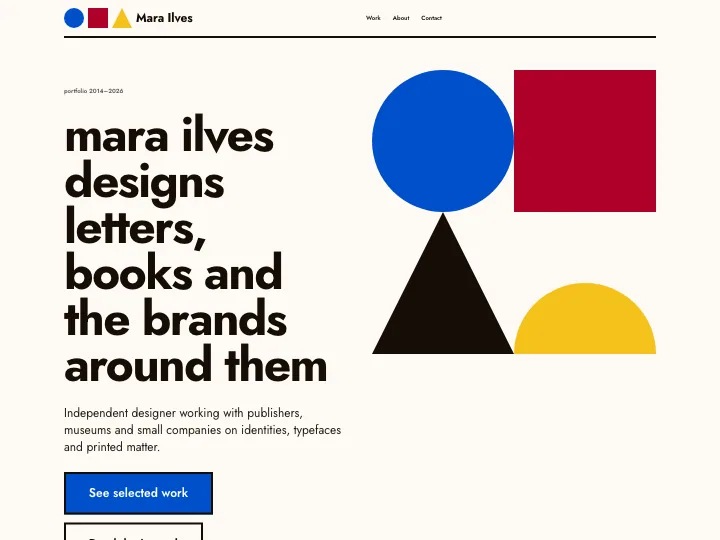
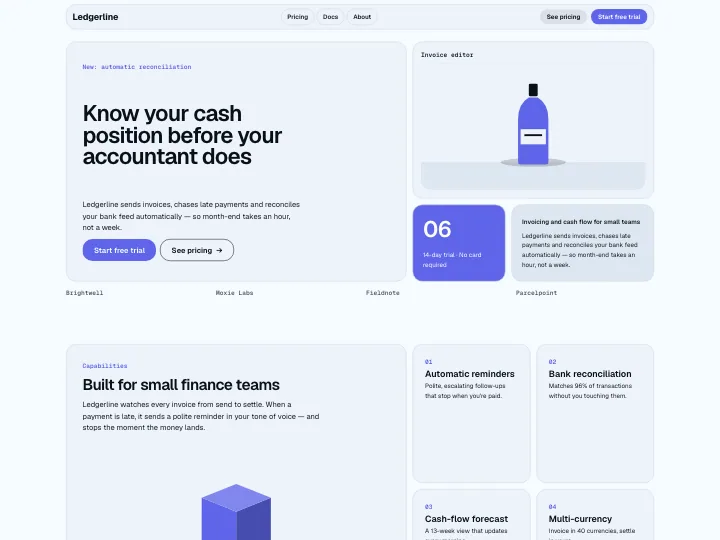
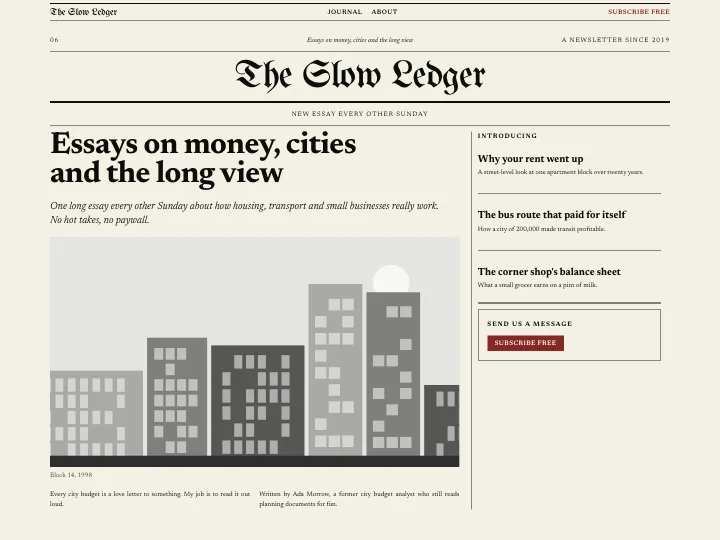
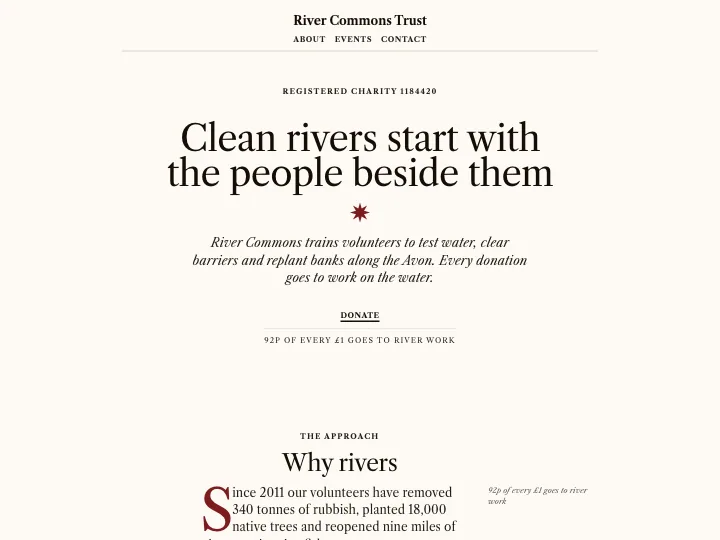
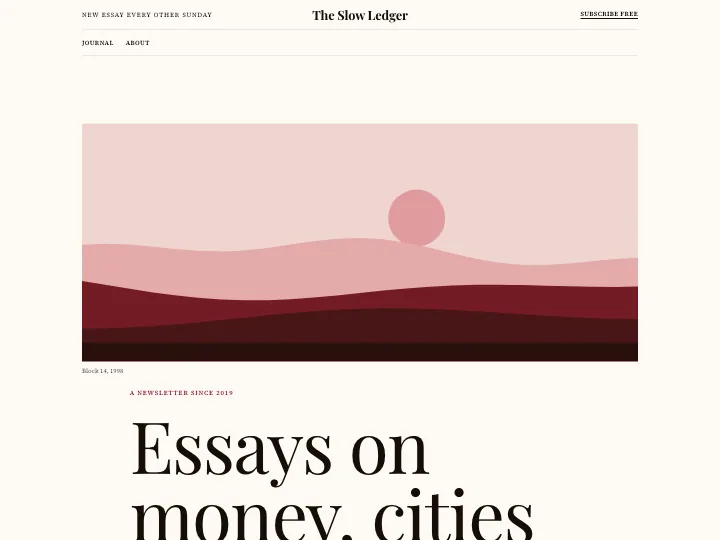
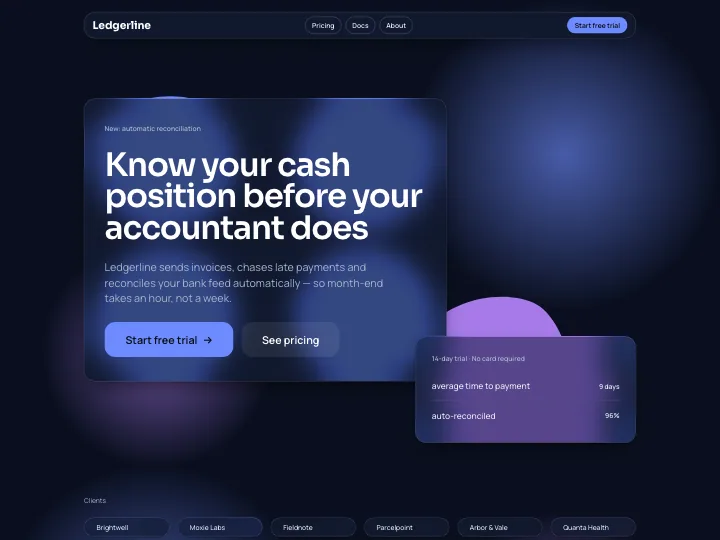
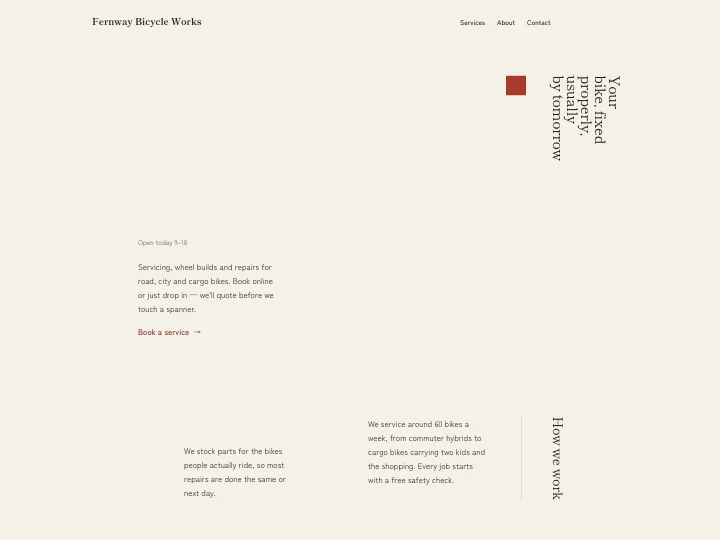
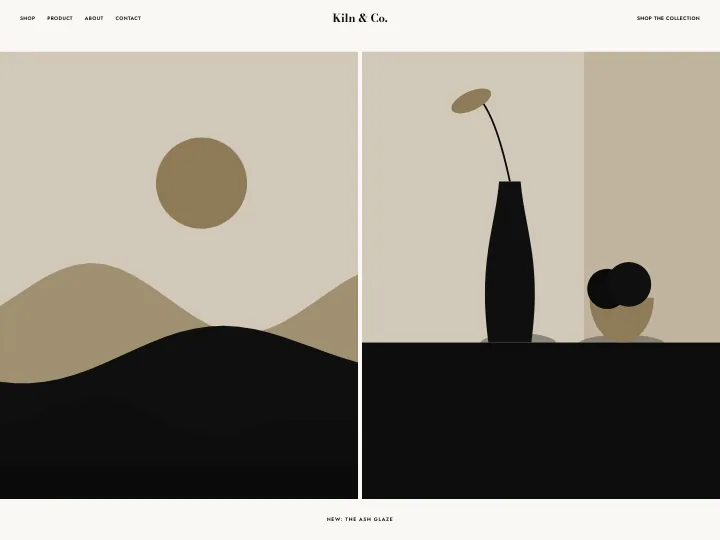
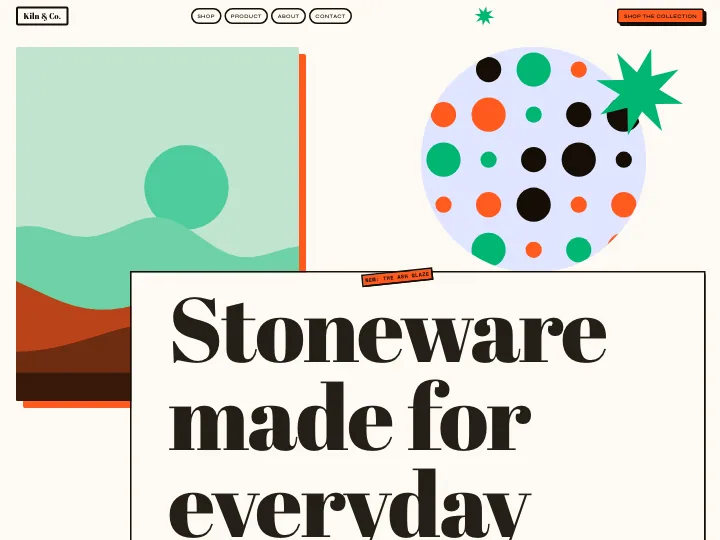
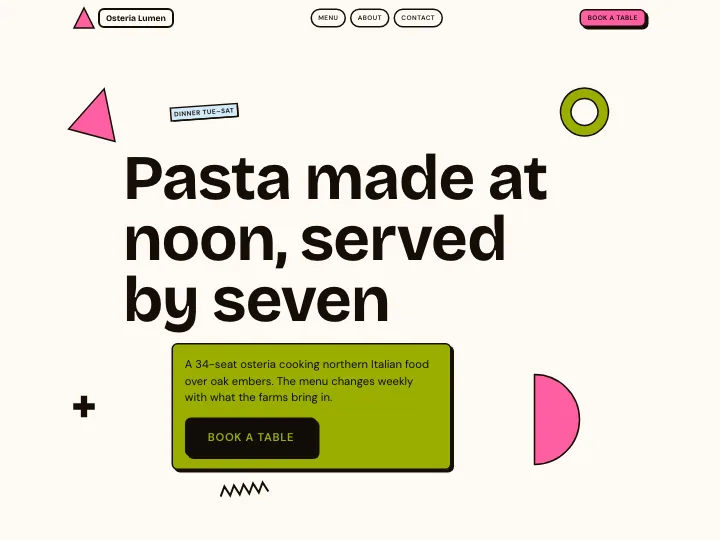
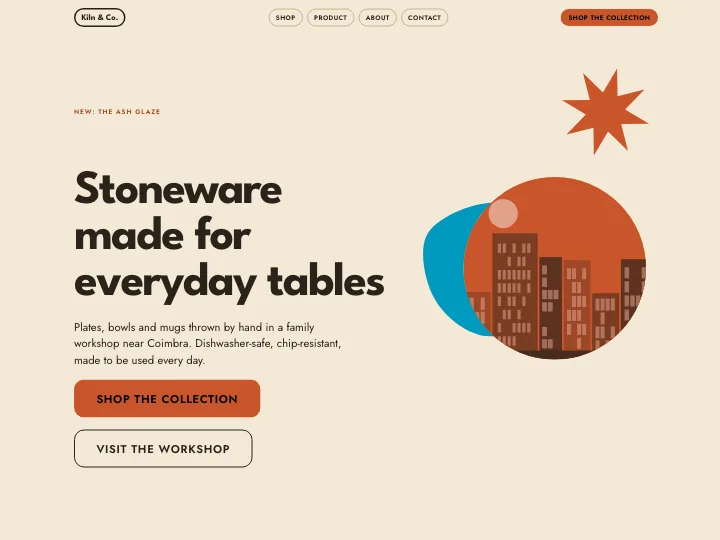
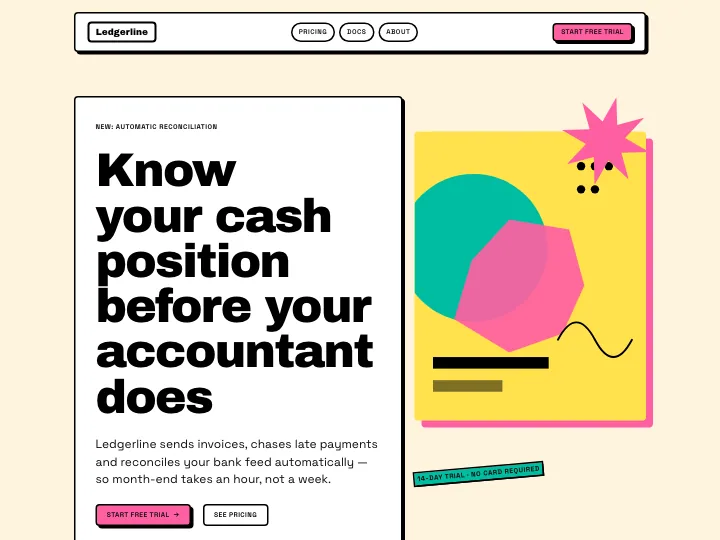
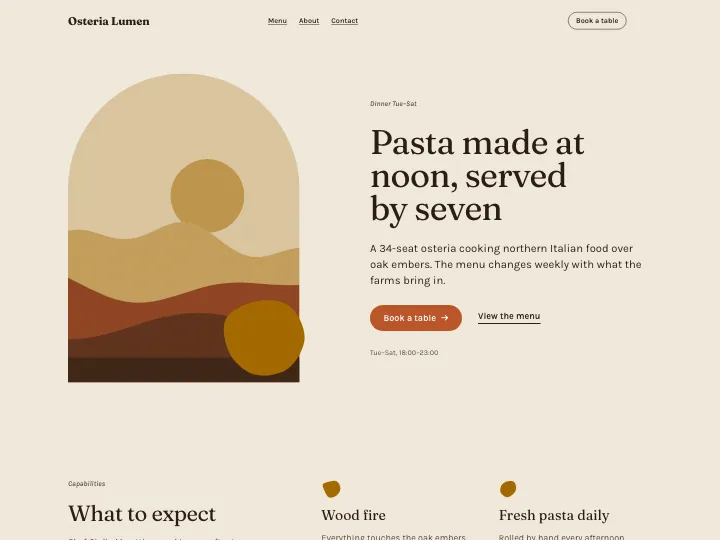
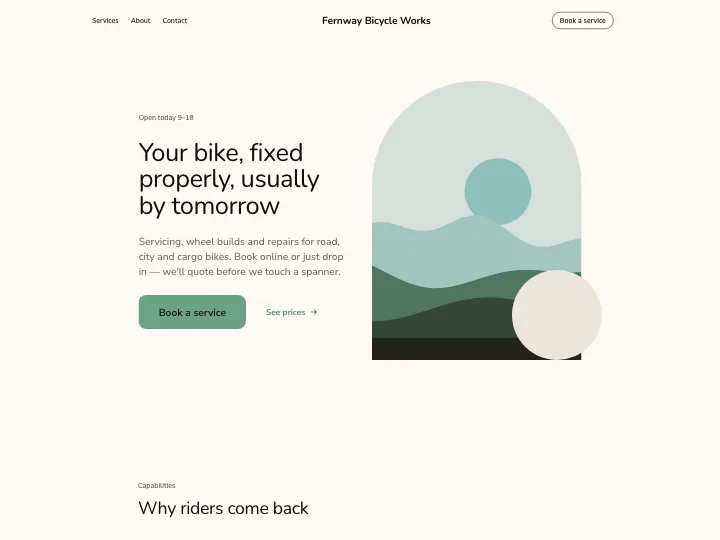
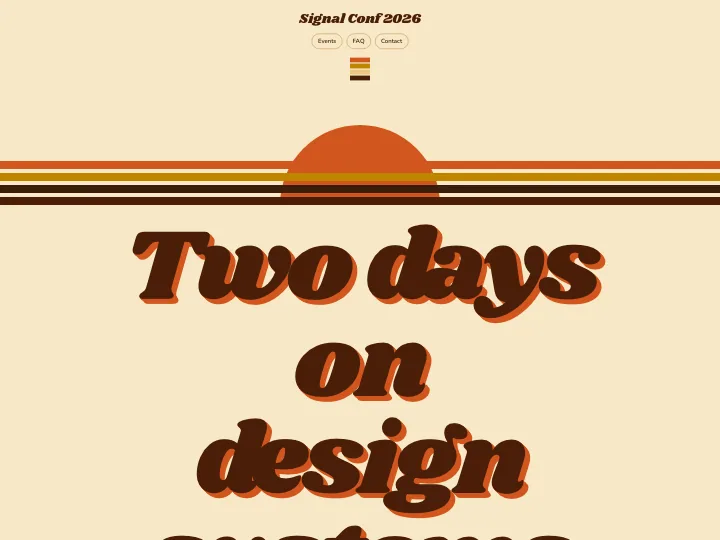
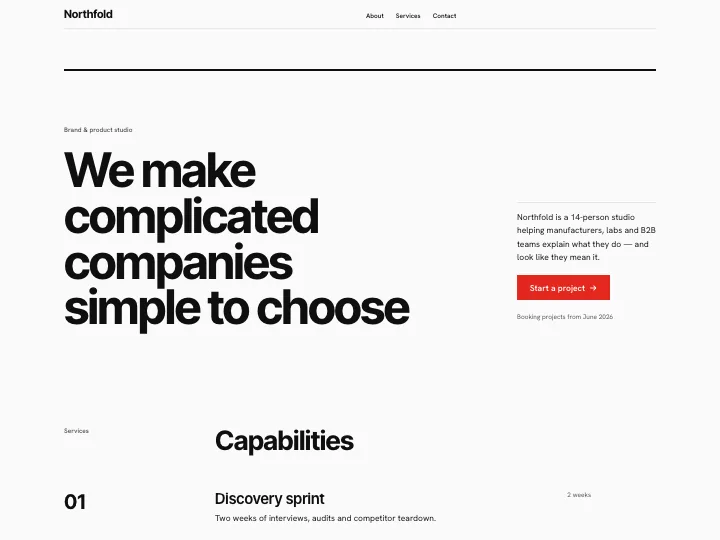
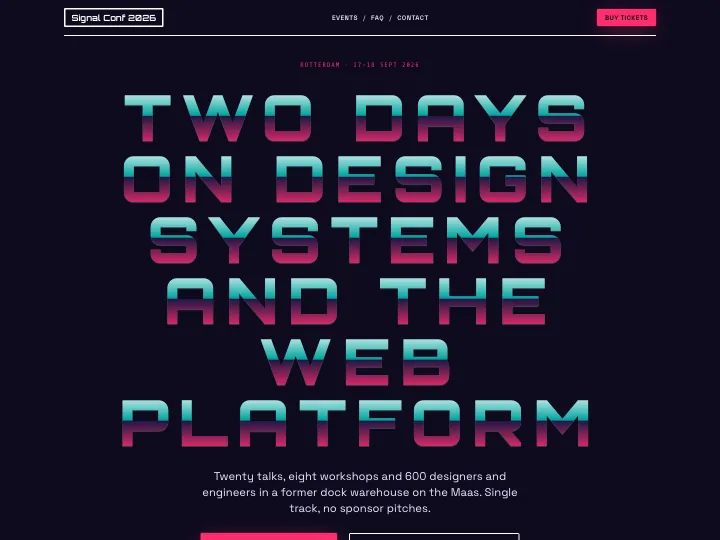
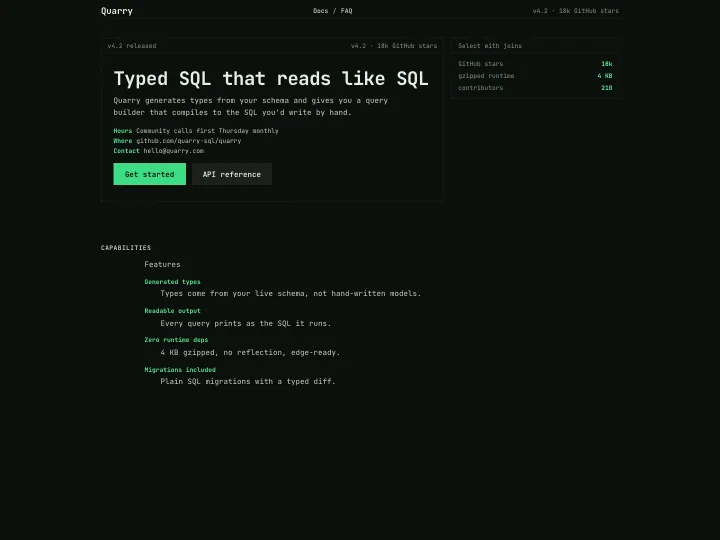
Each style brings its own grid, section patterns, type pairings and hard rules, with 149 variants between them. Open one to see a full page.
25 of 25 styles
- Art Deco
- Athletic Sport
- Bauhaus
- Bento Tech
- Broadsheet Newspaper
- Brutalist
- Classical Bookish
- Constructivist
- Editorial Magazine
- Frosted Glass
- Japanese Minimal
- Luxury Fashion
- Maximalist Collage
- Memphis
- Mid-Century Modern
- Neo-Brutalism
- Neo-grotesk Minimal
- Organic Earth
- Risograph Print
- Scandinavian Soft
- Seventies Psychedelic
- Swiss International
- Synthwave Retro-Future
- Terminal Mono
- Y2K Chrome




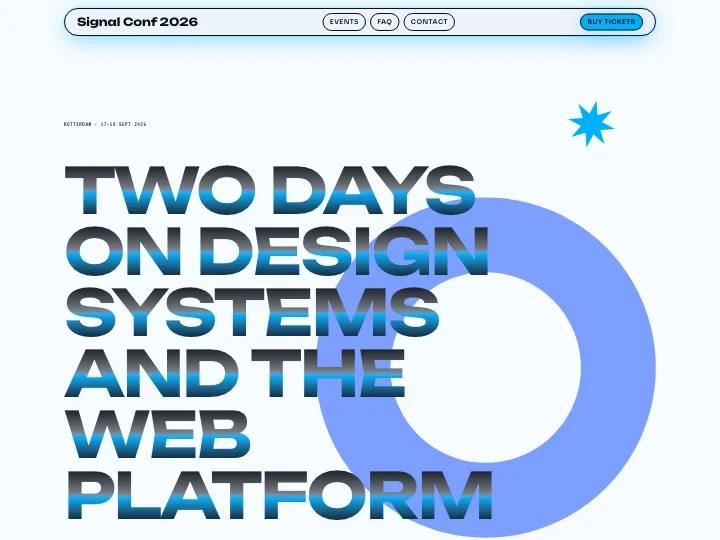
The handoff
What the agent receives.
The design code expands into three files the agent writes to design/ and follows literally. This is the real output for the Risograph Print bakery above. No free text ever travels in a code, so a shared code can’t smuggle instructions.
Design code
sd1.hVS7DsIwDPyXzgmiECFYGfofiAEqEInyGPh7zk6KDVLb2e-781FiHJO_xUu4Q3xQTmd2phsGdzxvO2TNXKyx1irpN653aG3QmEdLd3oDntB-sYEkCXigTP9Kiql3SOz74m1HuW1xAOOsuzD-yQbcQxprBPxBABN7IapZUT1K9iVXr6LjmS0Jw08xpmAIKQ7USQi8RXJNYuOwutvE_89uwBk2kagDAJ7kpFLI3q4-vC0MnH9vcb8qKAkmFD-wFg841QGkMc3R-LRw2YrufDnqtdz2TW8fH1if
Style: Risograph Print · light complementary palette (accent #FF48B0) Type: Bricolage Grotesque + Work Sans · 4 pages, 13 sections · Next.js + Tailwind CSS v4 Looks: none · no skills to install
design/DESIGN.md · The agent’s instructions: principles, hard rules, build order, acceptance checklist.
# Design: <site name> — Risograph Print

<!-- slopless: code=sd1.hVS7DsIwDPyXzgmiECFYGfofiAEqEInyGPh7zk6KDVLb2e-781FiHJO_xUu4Q3xQTmd2phsGdzxvO2TNXKyx1irpN653aG3QmEdLd3oDntB-sYEkCXigTP9Kiql3SOz74m1HuW1xAOOsuzD-yQbcQxprBPxBABN7IapZUT1K9iVXr6LjmS0Jw08xpmAIKQ7USQi8RXJNYuOwutvE_89uwBk2kagDAJ7kpFLI3q4-vC0MnH9vcb8qKAkmFD-wFg841QGkMc3R-LRw2YrufDnqtdz2TW8fH1if specVersion=1 revision=1 -->
Design code: sd1.hVS7DsIwDPyXzgmiECFYGfofiAEqEInyGPh7zk6KDVLb2e-781FiHJO_xUu4Q3xQTmd2phsGdzxvO2TNXKyx1irpN653aG3QmEdLd3oDntB-sYEkCXigTP9Kiql3SOz74m1HuW1xAOOsuzD-yQbcQxprBPxBABN7IapZUT1K9iVXr6LjmS0Jw08xpmAIKQ7USQi8RXJNYuOwutvE_89uwBk2kagDAJ7kpFLI3q4-vC0MnH9vcb8qKAkmFD-wFg841QGkMc3R-LRw2YrufDnqtdz2TW8fH1if · specVersion 1 · revision 1
Reference render: https://slopless.kuldeep.cc/r/sd1.hVS7DsIwDPyXzgmiECFYGfofiAEqEInyGPh7zk6KDVLb2e-781FiHJO_xUu4Q3xQTmd2phsGdzxvO2TNXKyx1irpN653aG3QmEdLd3oDntB-sYEkCXigTP9Kiql3SOz74m1HuW1xAOOsuzD-yQbcQxprBPxBABN7IapZUT1K9iVXr6LjmS0Jw08xpmAIKQ7USQi8RXJNYuOwutvE_89uwBk2kagDAJ7kpFLI3q4-vC0MnH9vcb8qKAkmFD-wFg841QGkMc3R-LRw2YrufDnqtdz2TW8fH1if (one pattern alone: add /p/<pattern id>)

> Replace <site name> with the site's name. Follow this file literally: its rules beat your own defaults. Exact values are in tokens.json, structure is in layout.json. Keep the design/ folder in the repo. Look at the reference render before building and compare your build with it at the end; it is a guide, this file and tokens.json are the source of truth.

## The design in words

- Style: Risograph Print — A small-press zine run through a risograph: two or three fluorescent spot inks on off-white stock, overprinted shapes and duotone photos, slightly misregistered heavy type and mono captions.
- Palette: complementary rule from seed #FF48B0, light mode
- Type: Bricolage Grotesque for headings, Work Sans for body, Space Mono for code; scale 1.414, base 17px
- Hero: Overprint poster (`hero.risograph-overprint-poster`)
- Pages: home (/), menu (/menu), about (/about), contact (/contact)
- Density: balanced
- Signature looks: none
- Stack: Next.js + Tailwind CSS v4, no component library

## Principles (follow literally)

- Print with two or three spot inks only: accent, accent2 and the ink colour; every image is a duotone in those inks
- Overprint on purpose: let shapes, photos and headlines overlap on explicit grid rows, never in tidy separate boxes
- Misregister the type: big uppercase headlines tilt a degree or two and carry a slight offset ghost in the second ink
- Lay pages out like a zine — contents pages, spreads, tear-off tabs, mono captions and page numbers
- Keep it flat: square corners, printed rules and borders, grain instead of gradients or shadows
- Use only the spot inks: `accent`, `accent2` and the text colour. Every photograph is a `duotone` of two of them (CSS: grayscale image + `mix-blend-mode: multiply` over an ink fill, or an SVG duotone filter).
- Overlap on purpose: place shapes, photos and headlines on the explicit `rowSpan`s given in `layout.json` so they overprint; set `mix-blend-mode: multiply` on the upper layer (light mode).
- Misregister display type: headlines get `text-shadow: 3px 2px 0 var(--accent2)` (or `accent`) and tilt by the `rotate` value in the tree (−2° to −4°).
- Set display and h1–h3 in uppercase at the heaviest weight with tight leading; set eyebrows, captions, page numbers and meta in the mono font.
- Add a paper-grain overlay to the whole page: a fixed, pointer-events-none SVG `feTurbulence` noise at 6–10 % opacity.
- Use printed rules and borders (`border` token, 2 px solid ink) for boxes, lists and dividers; a 4 px rule under the masthead and above the footer.
- Number things like a zine: issue numbers, contents page numbers, item numbers in the link colour.
- Keep square corners on everything, including buttons and form fields.
- At 375 px: stack in source order, keep tilts at half the angle, hide decorative shapes marked `mobile: hide`, keep the grain.

## Hard rules

- No gradients, glows, soft shadows or blur — the only shadow is the hard `offset-shadow` frame on a photo, offset in a spot ink.
- No full-colour photographs and no more than three inks on a page (paper doesn't count).
- No rounded corners, pills or circular avatars; circles appear only as solid ink shapes.
- No thin, light or italic body type; no centred paragraphs.
- No icon sets, emoji, glassmorphism or 3D renders.
- No three identical feature cards in a row — features are boxed in a staggered masonry beside a solid ink block.
- No pure-black text on pure-white; use the warm paper `bg` and the generated ink `text`.
- Never tilt body copy, forms or buttons — only display type, prices and stickers tilt.
- No rounded corners: border-radius is 0 on every element, including buttons, inputs and images.
- On an `accent` fill, all text, icons, borders and button outlines use `onAccent`, never heading or text (this beats any colour a principle names for buttons); a primary button there inverts to an onAccent fill with accent text.
- Shadows only in the style's "hard" treatment; nothing else casts a shadow.
- No centred hero + three-card feature row unless layout.json says so.
- Only colours from tokens.json: no other hex values, tints or opacity blends of brand colours.
- Only the font families listed under Typography.

## Palette

Light palette. Use colours by role; never hard-code a hex value outside the tokens.

| Role | Hex | Use |
| --- | --- | --- |
| bg | #FDF9F4 | Page background |
| surface | #F7F1EA | Cards, panels and alternating section backgrounds |
| surfaceAlt | #EDE5DB | Second surface for contrast blocks (callouts, bands) |
| text | #241E16 | Body text on bg, surface and surfaceAlt |
| textMuted | #605A51 | Secondary text (captions, meta) on bg (6.5:1), surface (6.1:1), surfaceAlt (5.5:1) |
| heading | #150E06 | Headings on bg (18.3:1), surface (17.1:1), surfaceAlt (15.3:1) |
| accent | #FF48B0 | Primary CTA fill and brand accent — use sparingly |
| onAccent | #100D08 | Text and icons on accent fills |
| accent2 | #00B790 | Secondary accent for highlights and secondary buttons |
| onAccent2 | #100D08 | Text and icons on accent2 fills |
| border | #DAD3CA | Hairlines, dividers and input borders (never text) |
| link | #D8158F | Inline links on bg |

WCAG AA (4.5:1) text pairs: text/bg 15.8:1, textMuted/bg 6.5:1, heading/bg 18.3:1, link/bg 4.5:1, text/surface 14.7:1, heading/surface 17.1:1, text/surfaceAlt 13.2:1, onAccent/accent 6.3:1, onAccent2/accent2 7.5:1.
Do not add a dark theme or a prefers-color-scheme variant unless the user asks; this palette is the design.

## Typography

- Heading: Bricolage Grotesque (google, weights 200, 300, 400, 500, 600, 700, 800) — stack: "Bricolage Grotesque", ui-sans-serif, system-ui, sans-serif
- Body: Work Sans (google, weights 100, 200, 300, 400, 500, 600, 700, 800, 900, italics) — stack: "Work Sans", ui-sans-serif, system-ui, sans-serif
- Mono: Space Mono (google, weights 400, 700, italics) — stack: "Space Mono", ui-monospace, SFMono-Regular, Menlo, monospace
- Scale ratio 1.414, base 17px. Labels and eyebrows: uppercase with wide tracking.

| Step | Desktop px | Tablet px | Phone px | Use |
| --- | --- | --- | --- | --- |
| -2 | 8.5 | 8.5 | 8 | fine print |
| -1 | 12 | 12 | 11.5 | small text, labels, eyebrows |
| 0 | 17 | 17 | 16 | body |
| 1 | 24 | 24 | 22.5 | lead paragraphs |
| 2 | 34 | 34 | 28 | h4 |
| 3 | 48 | 45 (fluid) | 34 (fluid) | h3 |
| 4 | 68 | 60 (fluid) | 42 (fluid) | h2 |
| 5 | 96 | 79.5 (fluid) | 52 (fluid) | h1 |
| 6 | 136 | 106 (fluid) | 64 (fluid) | display (hero headline) |
| 7 | 192 | 117 (fluid) | 70 (fluid) | oversized display |
| 8 | 271.5 | 117 (fluid) | 70 (fluid) | poster-size type |

Tablet and phone sizes are at the reference widths (834 and 390 px). Steps marked fluid use `clamp(<min>, <size ÷ reference width × 100>vw, <size>)`; the exact values are in the CSS under Stack and in tokens.json `viewports`. Headings and display text at step 4 and up also shrink so their longest word fits the content column: never break or hyphenate a word to make it fit.

Load Google fonts with next/font in app/layout.tsx:

```ts
import { Bricolage_Grotesque, Work_Sans, Space_Mono } from "next/font/google";
const headingFont = Bricolage_Grotesque({ subsets: ["latin"], weight: ["200", "300", "400", "500", "600", "700", "800"], variable: "--font-heading", display: "swap" });
const bodyFont = Work_Sans({ subsets: ["latin"], weight: ["100", "200", "300", "400", "500", "600", "700", "800", "900"], style: ["normal", "italic"], variable: "--font-body", display: "swap" });
const monoFont = Space_Mono({ subsets: ["latin"], weight: ["400", "700"], style: ["normal", "italic"], variable: "--font-mono", display: "swap" });
```

Put the font variables' classNames on <html>.

## Layout

- Grid: 12 columns, 20px gutter, content max width 1320px. Grid spans in layout.json are 1-based and inclusive ("1-8"); "full" means edge to edge.
- Spacing: unit 8px; steps 0=0, 1=8, 2=16, 3=24, 4=32, 5=40, 6=48, 8=64, 10=80, 12=96, 16=128 px. Section spacing 112px (balanced density).
- Radius 0px · border rule 2px · shadow hard · motion subtle (140ms steps(3, end)).
- Breakpoints: sm 640, md 768, lg 1024, xl 1280 px. Below sm, children stack in layout.json order unless a node's `mobile` says otherwise; where a style principle about phone order disagrees, the pattern (its layout.json order and its own phone rule) wins.
- layout.json lists each page's sections by `pattern` and `kind` only; each pattern's grid areas, slots, notes and layout tree appear once under `patterns`, keyed by pattern id.

### Viewports

The reference render draws three viewports. Build the same values in these ranges (tokens.json `viewports` has every value, CSS under Stack):

| Viewport | Width | Side padding (pad-x) | Gutter | Section padding | Body text |
| --- | --- | --- | --- | --- | --- |
| desktop | 1024 px and up (reference 1440) | 40px | 20px | 112px | 17px |
| tablet | 640–1023 px (reference 834) | 32px | 20px | 84px | 17px |
| phone | below 640 px (reference 390) | 20px | 16px | 56px | 16px |

- Content column: centred, `max-width: 1320px` including the side padding (box-sizing: border-box), so desktop copy is at most 1240px wide. Every section's copy sits in this column.
- Section padding is the top and bottom padding of every section unless its pattern names a vertical padding step; the nav uses space step 3 and the footer 60% of the section padding.
- Space steps 5 and up shrink to 62% on phone, 8 and up to 80% on tablet (tokens.json `viewports.<name>.space`).
- Full-bleed sections: the section is an edge-to-edge wrapper around the same content column. Its copy (text, buttons, forms) stays in the column, lined up with every other section; fills, media, marquees and rules on the column's outer edge break out to the viewport edge with a negative inline margin of `calc(var(--pad-x) + max(0px, (100vw - 1320px) / 2))` on that side. A section `background` always fills the full width.

### Pages and section order

Every page starts with `nav.risograph-masthead` and ends with `footer.risograph-colophon-print`. Between them:

- `/` (home): `hero.risograph-overprint-poster` → `list.risograph-contents-page` → `gallery.risograph-print-run` → `testimonial.risograph-cutout-quote` → `stats.risograph-ink-counts` → `cta.risograph-tear-off`
- `/menu` (menu): `list.risograph-contents-page` → `pricing.risograph-price-tags`
- `/about` (about): `content.risograph-photocopy-essay` → `stats.risograph-ink-counts` → `logos.risograph-stockists`
- `/contact` (contact): `contact.risograph-mail-order` → `logos.risograph-stockists`

### Patterns

Every pattern used in layout.json, defined here. Build each section exactly as its pattern says. Each live example is the reference render URL plus the path shown: that pattern alone with these tokens, beside its rule, grid and slots.

#### `nav.risograph-masthead` — Masthead

- Kind: nav · from Risograph Print
- Rule: A zine masthead: mono issue line on the left, the boxed wordmark in the middle, an underlined CTA flush right; slash-separated links on the next line and a 4 px ink rule under everything.
- Slots: `meta`, `siteName`, `cta`, `pages`
- Grid: issue 1-3 · logo 6-7 · cta 11-12
- Section: vertical padding step 2
- Live example: reference render + `/p/nav.risograph-masthead`

#### `hero.risograph-overprint-poster` — Overprint poster

- Kind: hero · from Risograph Print
- Rule: A spot-colour circle fills 7–12, a landscape duotone photo in 2–8 overprints it, and the uppercase headline (step 6) overprints the circle below the photo across 1–12, tilted −2°. Subhead and CTA bottom-right in 9–12.
- Slots: `eyebrow`, `heroImage`, `headline`, `subhead`, `cta`
- Grid: circle 7-12 · photo 2-8 · headline 1-12 · action 9-12
- Section: vertical padding step 6
- Notes: Rows are explicit so the three layers overlap: circle rows 1–4, photo rows 2–3, headline rows 4–5 (it overprints the circle, never the photo). Use mix-blend-mode: multiply on the photo and headline to fake overprinting; misregister the headline with a 3 px accent2 text-shadow.
- Live example: reference render + `/p/hero.risograph-overprint-poster`

#### `list.risograph-contents-page` — Contents page

- Kind: list · from Risograph Print
- Rule: An 'In this issue' page: mono label, uppercase title in 1–8, then a ruled list with the big number in 1–2, title in 3–8, a line in 9–11 and the mono page number in 12.
- Slots: `sectionLabel`, `title`, `items[4..8]`
- Grid: entry 1-8 · line 9-11 · page 12-12
- Live example: reference render + `/p/list.risograph-contents-page`

#### `gallery.risograph-print-run` — Print run

- Kind: gallery · from Risograph Print
- Rule: Three duotone prints on an uneven grid — a 3:4 in 1–5 over two rows, a 16:9 in 6–12, a 1:1 in 6–9 — with a spot-colour circle filling 10–12 beside the square.
- Slots: `title`, `caption`, `gallery1`, `gallery2`, `gallery3`
- Grid: title 1-6 · caption 9-12 · tall 1-5 · wide 6-12 · square 6-9 · circle 10-12
- Live example: reference render + `/p/gallery.risograph-print-run`

#### `testimonial.risograph-cutout-quote` — Cut-out quote

- Kind: testimonial · from Risograph Print
- Rule: The quote sits on a solid spot-colour slab in 2–9; the attribution drops below it, offset to 9–12, under a printed rule.
- Slots: `quote`, `author`, `role`
- Grid: slab 2-9 · attribution 9-12
- Live example: reference render + `/p/testimonial.risograph-cutout-quote`

#### `stats.risograph-ink-counts` — Ink counts

- Kind: stats · from Risograph Print
- Rule: Uppercase title across the grid, then three or four counts in a four-column row, each opened by a left rule: number at step 5 (every figure the same size) in the link colour, mono caption.
- Slots: `title`, `stats[3..4]`
- Grid: title 1-12 · counts 1-12
- Live example: reference render + `/p/stats.risograph-ink-counts`

#### `cta.risograph-tear-off` — Tear-off flyer

- Kind: cta · from Risograph Print
- Rule: A flyer on surfaceAlt: uppercase headline in 1–9, line and button in 10–12, a dashed cut line, then a row of tear-off tabs with the contact detail repeated.
- Slots: `headline`, `body`, `cta`, `items[6..8]`
- Grid: headline 1-9 · action 10-12
- Section: background surfaceAlt
- Notes: The tabs are narrow boxes with a left rule; on desktop rotate their text 90° like a real tear-off flyer, flat at phone width (scroll-x).
- Live example: reference render + `/p/cta.risograph-tear-off`

#### `pricing.risograph-price-tags` — Price tags

- Kind: pricing · from Risograph Print
- Rule: Uppercase title across the grid; two or three plans as bordered price tags, each with a mono plan name, a tilted price at step 6, a line and a small button.
- Slots: `title`, `plans[2..3]`
- Notes: Tilt each price −4° so the tags look hand-stamped; the tags themselves stay square to the grid.
- Live example: reference render + `/p/pricing.risograph-price-tags`

#### `content.risograph-photocopy-essay` — Photocopy essay

- Kind: content · from Risograph Print
- Rule: Tilted uppercase title in 1–7 over a duotone 4:5 photo in 1–5; the mono lead in 6–12 and two narrow body columns in 6–9 and 10–12 beside the photo.
- Slots: `title`, `image`, `lead`, `body2`, `body3`
- Grid: title 1-7 · photo 1-5 · lead 6-12 · col1 6-9 · col2 10-12
- Live example: reference render + `/p/content.risograph-photocopy-essay`

#### `logos.risograph-stockists` — Stockists

- Kind: logos · from Risograph Print
- Rule: Mono label in 1–3; eight to sixteen stockist names typeset in three columns across 4–12, uppercase. No logos.
- Slots: `sectionLabel`, `clients[8..16]`
- Grid: label 1-3 · list 4-12
- Live example: reference render + `/p/logos.risograph-stockists`

#### `contact.risograph-mail-order` — Mail-order form

- Kind: contact · from Risograph Print
- Rule: Title, a line, the mono address and email in 1–5; a bordered 'order form' box in 6–12 with a mono label and the contact form.
- Slots: `title`, `body`, `address`, `email`, `eyebrow`, `contact`
- Grid: details 1-5 · order 6-12
- Live example: reference render + `/p/contact.risograph-mail-order`

#### `footer.risograph-colophon-print` — Print colophon

- Kind: footer · from Risograph Print
- Rule: A 4 px ink rule, then boxed wordmark in 1–3, the mono print colophon in 4–8 and slash links on one line in 10–12; a marquee of the tagline closes the page.
- Slots: `siteName`, `legal`, `pages`, `tagline`
- Grid: logo 1-3 · colophon 4-8 · links 10-12
- Section: vertical padding step 4
- Live example: reference render + `/p/footer.risograph-colophon-print`

## Stack

Next.js + Tailwind CSS v4, no component library.

Tokens are CSS variables declared in the global stylesheet with a Tailwind v4 `@theme` block (no tailwind.config.js). Use the generated utilities (`bg-bg`, `text-heading`, `font-heading`, `text-step-6`, `p-4` = 4 × space unit, `rounded-base`) — never arbitrary values like `bg-[#…]`.

```css
@import "tailwindcss";

@theme {
  --color-bg: #FDF9F4;
  --color-surface: #F7F1EA;
  --color-surface-alt: #EDE5DB;
  --color-text: #241E16;
  --color-text-muted: #605A51;
  --color-heading: #150E06;
  --color-accent: #FF48B0;
  --color-on-accent: #100D08;
  --color-accent2: #00B790;
  --color-on-accent2: #100D08;
  --color-border: #DAD3CA;
  --color-link: #D8158F;
  --font-heading: "Bricolage Grotesque", ui-sans-serif, system-ui, sans-serif;
  --font-body: "Work Sans", ui-sans-serif, system-ui, sans-serif;
  --font-mono: "Space Mono", ui-monospace, SFMono-Regular, Menlo, monospace;
  --text-step-n2: 8.5px;
  --text-step-n1: 12px;
  --text-step-0: 17px;
  --text-step-1: 24px;
  --text-step-2: 34px;
  --text-step-3: 48px;
  --text-step-4: 68px;
  --text-step-5: 96px;
  --text-step-6: 136px;
  --text-step-7: 192px;
  --text-step-8: 271.5px;
  --spacing: 8px;
  --radius-base: 0px;
  --ease-style: steps(3, end);
}

:root {
  --pad-x: 40px;
  --space-unit: 8px;
  --space-section: 112px;
  --radius: 0px;
  --border-width: 2px;
  --grid-columns: 12;
  --grid-gutter: 20px;
  --grid-max: 1320px;
  --motion-duration: 140ms;
  --motion-easing: steps(3, end);
}

@media (max-width: 1023px) {
  :root {
    --pad-x: 32px;
    --space-section: 84px;
    --text-step-3: clamp(31px, 5.396vw, 45px);
    --text-step-4: clamp(42px, 7.194vw, 60px);
    --text-step-5: clamp(56px, 9.532vw, 79.5px);
    --text-step-6: clamp(74px, 12.710vw, 106px);
    --text-step-7: clamp(82px, 14.029vw, 117px);
    --text-step-8: clamp(82px, 14.029vw, 117px);
  }
}

@media (max-width: 639px) {
  :root {
    --pad-x: 20px;
    --grid-gutter: 16px;
    --space-section: 56px;
    --text-step-n2: 8px;
    --text-step-n1: 11.5px;
    --text-step-0: 16px;
    --text-step-1: 22.5px;
    --text-step-2: 28px;
    --text-step-3: clamp(24px, 8.718vw, 34px);
    --text-step-4: clamp(29px, 10.769vw, 42px);
    --text-step-5: clamp(36px, 13.333vw, 52px);
    --text-step-6: clamp(45px, 16.410vw, 64px);
    --text-step-7: clamp(49px, 17.949vw, 70px);
    --text-step-8: clamp(49px, 17.949vw, 70px);
  }
}
```

- `--spacing` stays one space unit at every width: for gaps and paddings at space steps 5 and up, use the smaller tablet and phone values from tokens.json `viewports` (`max-lg:` and `max-sm:` variants).
- App Router. One shared root layout (app/layout.tsx) holds the nav and footer patterns.
- Load fonts with next/font in the root layout and expose them as the --font-* variables.
- Use the Metadata API (export const metadata / generateMetadata) for titles, descriptions and Open Graph.
- Server Components by default; add "use client" only to components that need interaction.
- No component library: hand-write components from the patterns.

## SEO

- Static: pre-render every page at build time. No per-request server rendering.
- Unique title (50–60 characters) and meta description (140–160) per page, plus a canonical URL.
- Open Graph and Twitter card tags per page, with a 1200×630 share image.
- schema.org JSON-LD: Organization, LocalBusiness.
- sitemap.xml listing every page, and robots.txt pointing to it (app/sitemap.ts and app/robots.ts).
- Images as AVIF with a fallback, explicit width and height, lazy-loaded below the fold; the hero image loads eagerly with fetchpriority="high".
- JavaScript budget: 170 KB gzipped on the heaviest page, signature looks included.
- One h1 per page; semantic landmarks (header, nav, main, footer); visible focus styles.

## Build order

1. Install fonts and write tokens (global CSS with @theme) from tokens.json
2. Global layout and grid: `nav.risograph-masthead` and `footer.risograph-colophon-print`, 12-column grid, max width 1320px
3. Sections in layout.json order, page by page (home first), each matching its pattern above
4. Responsive pass at 375 px, 768 px and 1440 px
5. SEO
6. Run the acceptance checklist and `npx slopless check`

## Acceptance checklist

- [ ] Every section matches its pattern in layout.json, in layout.json order
- [ ] Each section root has data-pattern="<pattern id>" so `npx slopless check` can verify the order
- [ ] Only colours from tokens.json are used
- [ ] Only the fonts under Typography are loaded
- [ ] All hard rules hold at 375 px and 1440 px
- [ ] No horizontal scrolling at 375 px; nothing overflows
- [ ] All text pairs pass WCAG AA
- [ ] JavaScript stays under 170 KB gzipped
- [ ] SEO items above are in place
- [ ] `npx slopless check` passes

## Editing this design

To change the design later, call `edit_design` with the design code above and the user's request. Apply only what design/CHANGES.md lists, then run the checklist again.
design/tokens.json · Exact values: colours with roles, type scale, spacing, radius, motion, breakpoints.
{
  "specVersion": 1,
  "color": {
    "bg": "#FDF9F4",
    "surface": "#F7F1EA",
    "surfaceAlt": "#EDE5DB",
    "text": "#241E16",
    "textMuted": "#605A51",
    "heading": "#150E06",
    "accent": "#FF48B0",
    "onAccent": "#100D08",
    "accent2": "#00B790",
    "onAccent2": "#100D08",
    "border": "#DAD3CA",
    "link": "#D8158F"
  },
  "roles": {
    "text": "text",
    "background": "bg",
    "link": "link",
    "cta": "accent"
  },
  "mode": "light",
  "font": {
    "heading": {
      "family": "Bricolage Grotesque",
      "fallback": "ui-sans-serif, system-ui, sans-serif",
      "weights": [
        200,
        300,
        400,
        500,
        600,
        700,
        800
      ],
      "source": "google"
    },
    "body": {
      "family": "Work Sans",
      "fallback": "ui-sans-serif, system-ui, sans-serif",
      "weights": [
        100,
        200,
        300,
        400,
        500,
        600,
        700,
        800,
        900
      ],
      "source": "google"
    },
    "mono": {
      "family": "Space Mono",
      "fallback": "ui-monospace, SFMono-Regular, Menlo, monospace",
      "weights": [
        400,
        700
      ],
      "source": "google"
    },
    "scale": 1.414,
    "base": 17,
    "steps": {
      "0": 17,
      "1": 24,
      "2": 34,
      "3": 48,
      "4": 68,
      "5": 96,
      "6": 136,
      "7": 192,
      "8": 271.5,
      "-2": 8.5,
      "-1": 12
    }
  },
  "space": {
    "unit": 8,
    "section": 112,
    "steps": {
      "0": 0,
      "1": 8,
      "2": 16,
      "3": 24,
      "4": 32,
      "5": 40,
      "6": 48,
      "8": 64,
      "10": 80,
      "12": 96,
      "16": 128
    }
  },
  "radius": 0,
  "border": {
    "style": "rule",
    "width": 2
  },
  "shadow": "hard",
  "motion": {
    "level": "subtle",
    "durationMs": 140,
    "easing": "steps(3, end)"
  },
  "grid": {
    "columns": 12,
    "gutter": 20,
    "max": 1320
  },
  "breakpoints": {
    "sm": 640,
    "md": 768,
    "lg": 1024,
    "xl": 1280
  },
  "gradients": false,
  "labelCase": "uppercase",
  "viewports": {
    "desktop": {"minWidth":1024,"renderedAt":1440,"padX":40,"gutter":20,"section":112,"steps":{"0":17,"1":24,"2":34,"3":48,"4":68,"5":96,"6":136,"7":192,"8":271.5,"-2":8.5,"-1":12},"space":{"0":0,"1":8,"2":16,"3":24,"4":32,"5":40,"6":48,"8":64,"10":80,"12":96,"16":128}},
    "tablet": {"minWidth":640,"maxWidth":1023,"renderedAt":834,"padX":32,"gutter":20,"section":84,"steps":{"0":17,"1":24,"2":34,"3":45,"4":60,"5":79.5,"6":106,"7":117,"8":117,"-2":8.5,"-1":12},"fluid":{"3":"clamp(31px, 5.396vw, 45px)","4":"clamp(42px, 7.194vw, 60px)","5":"clamp(56px, 9.532vw, 79.5px)","6":"clamp(74px, 12.710vw, 106px)","7":"clamp(82px, 14.029vw, 117px)","8":"clamp(82px, 14.029vw, 117px)"},"space":{"0":0,"1":8,"2":16,"3":24,"4":32,"5":40,"6":48,"8":51,"10":64,"12":77,"16":102}},
    "phone": {"maxWidth":639,"renderedAt":390,"padX":20,"gutter":16,"section":56,"steps":{"0":16,"1":22.5,"2":28,"3":34,"4":42,"5":52,"6":64,"7":70,"8":70,"-2":8,"-1":11.5},"fluid":{"3":"clamp(24px, 8.718vw, 34px)","4":"clamp(29px, 10.769vw, 42px)","5":"clamp(36px, 13.333vw, 52px)","6":"clamp(45px, 16.410vw, 64px)","7":"clamp(49px, 17.949vw, 70px)","8":"clamp(49px, 17.949vw, 70px)"},"space":{"0":0,"1":8,"2":16,"3":24,"4":32,"5":25,"6":30,"8":40,"10":50,"12":60,"16":79}}
  }
}
design/layout.json · Structure: pages → sections → blocks, each with its pattern, grid placement and slots.
{
  "specVersion": 1,
  "style": "risograph-print",
  "nav": {"pattern":"nav.risograph-masthead","kind":"nav"},
  "footer": {"pattern":"footer.risograph-colophon-print","kind":"footer"},
  "pages": [
    { "type": "home", "path": "/", "sections": [
      {"pattern":"hero.risograph-overprint-poster","kind":"hero"},
      {"pattern":"list.risograph-contents-page","kind":"list"},
      {"pattern":"gallery.risograph-print-run","kind":"gallery"},
      {"pattern":"testimonial.risograph-cutout-quote","kind":"testimonial"},
      {"pattern":"stats.risograph-ink-counts","kind":"stats"},
      {"pattern":"cta.risograph-tear-off","kind":"cta"}
    ] },
    { "type": "menu", "path": "/menu", "sections": [
      {"pattern":"list.risograph-contents-page","kind":"list"},
      {"pattern":"pricing.risograph-price-tags","kind":"pricing"}
    ] },
    { "type": "about", "path": "/about", "sections": [
      {"pattern":"content.risograph-photocopy-essay","kind":"content"},
      {"pattern":"stats.risograph-ink-counts","kind":"stats"},
      {"pattern":"logos.risograph-stockists","kind":"logos"}
    ] },
    { "type": "contact", "path": "/contact", "sections": [
      {"pattern":"contact.risograph-mail-order","kind":"contact"},
      {"pattern":"logos.risograph-stockists","kind":"logos"}
    ] }
  ],
  "patterns": {
    "nav.risograph-masthead": {"grid":{"issue":"1-3","logo":"6-7","cta":"11-12"},"slots":["meta","siteName","cta","pages"],"tree":{"el":"box","gap":2,"children":[{"el":"box","dir":"row","gap":3,"align":"center","justify":"between","children":[{"el":"text","mobile":"hide","slot":"meta","role":"small","font":"mono"},{"el":"logo","slot":"siteName","style":"boxed"},{"el":"button","slot":"cta","variant":"underline","size":"sm"}]},{"el":"nav-links","mobile":"scroll-x","slot":"pages","dir":"row","style":"slash"},{"el":"divider","weight":4}]}},
    "footer.risograph-colophon-print": {"grid":{"logo":"1-3","colophon":"4-8","links":"10-12"},"slots":["siteName","legal","pages","tagline"],"tree":{"el":"box","gap":4,"children":[{"el":"divider","weight":4},{"el":"grid","gap":3,"children":[{"el":"logo","span":"1-3","slot":"siteName","style":"boxed"},{"el":"text","span":"4-8","slot":"legal","role":"small","maxCh":52,"font":"mono"},{"el":"nav-links","span":"10-12","slot":"pages","dir":"row","style":"slash"}]},{"el":"marquee","slot":"tagline","role":"label"}]}},
    "hero.risograph-overprint-poster": {"grid":{"circle":"7-12","photo":"2-8","headline":"1-12","action":"9-12"},"slots":["eyebrow","heroImage","headline","subhead","cta"],"notes":"Rows are explicit so the three layers overlap: circle rows 1–4, photo rows 2–3, headline rows 4–5 (it overprints the circle, never the photo). Use mix-blend-mode: multiply on the photo and headline to fake overprinting; misregister the headline with a 3 px accent2 text-shadow.","tree":{"el":"grid","gap":3,"rowGap":0,"align":"start","minVh":0.9,"children":[{"el":"text","span":"1-5","rowSpan":"1-1","slot":"eyebrow","role":"eyebrow","font":"mono"},{"el":"shape","span":"7-12","rowSpan":"1-4","mobile":"hide","kind":"circle","size":"fill","fill":"accent"},{"el":"media","span":"2-8","rowSpan":"2-3","slot":"heroImage","aspect":"3/2","treatment":"duotone","frame":"offset-shadow"},{"el":"text","span":"1-12","rowSpan":"4-5","slot":"headline","role":"display","step":6,"transform":"uppercase","tracking":"tight","leading":"tight","maxCh":16,"rotate":-2},{"el":"box","span":"9-12","rowSpan":"6-6","alignSelf":"start","gap":2,"children":[{"el":"text","slot":"subhead","role":"body","maxCh":36},{"el":"button","slot":"cta","variant":"primary","arrow":true}]}]}},
    "list.risograph-contents-page": {"grid":{"entry":"1-8","line":"9-11","page":"12-12"},"slots":["sectionLabel","title","items[4..8]"],"tree":{"el":"grid","gap":3,"rowGap":3,"children":[{"el":"text","span":"1-12","slot":"sectionLabel","role":"eyebrow","font":"mono"},{"el":"text","span":"1-8","slot":"title","role":"display","step":6,"transform":"uppercase","leading":"tight","maxCh":16},{"el":"repeat","span":"1-12","slot":"items","min":4,"max":8,"layout":"list","divider":true,"of":{"el":"grid","gap":3,"pad":[2,0],"align":"baseline","children":[{"el":"box","span":"1-8","mobile":"keep","dir":"row","gap":4,"align":"baseline","children":[{"el":"text","color":"link","slot":"number","role":"number","step":5},{"el":"text","slot":"title","role":"h3","transform":"uppercase"}]},{"el":"text","span":"9-11","mobile":"hide","slot":"body","role":"small","maxCh":40},{"el":"text","span":"12-12","slot":"meta","role":"label","font":"mono"}]}}]}},
    "gallery.risograph-print-run": {"grid":{"title":"1-6","caption":"9-12","tall":"1-5","wide":"6-12","square":"6-9","circle":"10-12"},"slots":["title","caption","gallery1","gallery2","gallery3"],"tree":{"el":"grid","gap":3,"rowGap":3,"children":[{"el":"text","span":"1-6","rowSpan":"1-1","slot":"title","role":"h2","transform":"uppercase","maxCh":18},{"el":"text","span":"9-12","rowSpan":"1-1","alignSelf":"end","slot":"caption","role":"small","align":"right","font":"mono"},{"el":"media","span":"1-5","rowSpan":"2-3","slot":"gallery1","aspect":"3/4","treatment":"duotone","frame":"offset-shadow"},{"el":"media","span":"6-12","rowSpan":"2-2","slot":"gallery2","aspect":"16/9","treatment":"duotone"},{"el":"media","span":"6-9","rowSpan":"3-3","slot":"gallery3","aspect":"1/1","treatment":"duotone"},{"el":"shape","span":"10-12","rowSpan":"3-3","mobile":"hide","kind":"circle","size":"lg","fill":"accent"}]}},
    "testimonial.risograph-cutout-quote": {"grid":{"slab":"2-9","attribution":"9-12"},"slots":["quote","author","role"],"tree":{"el":"grid","gap":3,"rowGap":2,"children":[{"el":"box","span":"2-9","bg":"accent","gap":3,"pad":[6,5],"children":[{"el":"text","color":"onAccent","slot":"quote","role":"quote","step":4,"leading":"tight","maxCh":36}]},{"el":"box","span":"9-12","gap":1,"pad":[2,0],"border":"top","children":[{"el":"text","slot":"author","role":"label","transform":"uppercase","font":"mono"},{"el":"text","color":"textMuted","slot":"role","role":"small"}]}]}},
    "stats.risograph-ink-counts": {"grid":{"title":"1-12","counts":"1-12"},"slots":["title","stats[3..4]"],"tree":{"el":"grid","gap":3,"rowGap":5,"children":[{"el":"text","span":"1-12","slot":"title","role":"h2","step":5,"transform":"uppercase","maxCh":24},{"el":"repeat","span":"1-12","slot":"stats","min":3,"max":4,"layout":"grid","cols":4,"gap":0,"of":{"el":"box","gap":1,"pad":[2,3],"border":"left","children":[{"el":"text","color":"link","slot":"number","role":"number","step":5,"leading":"tight"},{"el":"text","slot":"body","role":"small","maxCh":20,"font":"mono"}]}}]}},
    "cta.risograph-tear-off": {"grid":{"headline":"1-9","action":"10-12"},"slots":["headline","body","cta","items[6..8]"],"notes":"The tabs are narrow boxes with a left rule; on desktop rotate their text 90° like a real tear-off flyer, flat at phone width (scroll-x).","bg":"surfaceAlt","tree":{"el":"box","gap":4,"children":[{"el":"grid","gap":3,"align":"end","children":[{"el":"text","span":"1-9","slot":"headline","role":"display","step":6,"transform":"uppercase","leading":"tight","maxCh":16},{"el":"box","span":"10-12","gap":2,"children":[{"el":"text","slot":"body","role":"small","maxCh":32},{"el":"button","slot":"cta","variant":"primary","arrow":true}]}]},{"el":"divider","weight":2},{"el":"repeat","mobile":"scroll-x","slot":"items","min":6,"max":8,"layout":"row","gap":0,"of":{"el":"box","pad":[3,2],"border":"left","children":[{"el":"text","slot":"title","role":"label","font":"mono"}]}}]}},
    "pricing.risograph-price-tags": {"slots":["title","plans[2..3]"],"notes":"Tilt each price −4° so the tags look hand-stamped; the tags themselves stay square to the grid.","tree":{"el":"box","gap":4,"children":[{"el":"text","slot":"title","role":"h2","transform":"uppercase","maxCh":24},{"el":"repeat","slot":"plans","min":2,"max":3,"layout":"grid","cols":3,"gap":3,"of":{"el":"box","gap":2,"pad":[3,3],"border":"all","children":[{"el":"text","slot":"title","role":"label","transform":"uppercase","font":"mono"},{"el":"text","slot":"number","role":"number","step":6,"rotate":-4},{"el":"text","slot":"body","role":"small","maxCh":36},{"el":"button","slot":"cta","variant":"secondary","size":"sm"}]}}]}},
    "content.risograph-photocopy-essay": {"grid":{"title":"1-7","photo":"1-5","lead":"6-12","col1":"6-9","col2":"10-12"},"slots":["title","image","lead","body2","body3"],"tree":{"el":"grid","gap":3,"rowGap":3,"align":"start","children":[{"el":"text","span":"1-7","rowSpan":"1-1","slot":"title","role":"h1","step":6,"transform":"uppercase","leading":"tight","maxCh":14,"rotate":-2},{"el":"media","span":"1-5","rowSpan":"2-3","slot":"image","aspect":"4/5","treatment":"duotone","frame":"offset-shadow"},{"el":"text","span":"6-12","rowSpan":"2-2","slot":"lead","role":"lead","maxCh":52,"font":"mono"},{"el":"text","span":"6-9","rowSpan":"3-3","slot":"body2","role":"body","maxCh":40},{"el":"text","span":"10-12","rowSpan":"3-3","slot":"body3","role":"body","maxCh":32}]}},
    "logos.risograph-stockists": {"grid":{"label":"1-3","list":"4-12"},"slots":["sectionLabel","clients[8..16]"],"tree":{"el":"grid","gap":3,"children":[{"el":"text","span":"1-3","slot":"sectionLabel","role":"eyebrow","font":"mono"},{"el":"repeat","span":"4-12","slot":"clients","min":8,"max":16,"layout":"grid","cols":3,"gap":1,"of":{"el":"text","slot":"title","role":"label","transform":"uppercase"}}]}},
    "contact.risograph-mail-order": {"grid":{"details":"1-5","order":"6-12"},"slots":["title","body","address","email","eyebrow","contact"],"tree":{"el":"grid","gap":3,"align":"start","children":[{"el":"box","span":"1-5","gap":3,"children":[{"el":"text","slot":"title","role":"h2","transform":"uppercase"},{"el":"text","slot":"body","role":"body","maxCh":40},{"el":"text","slot":"address","role":"body","font":"mono"},{"el":"text","slot":"email","role":"body","font":"mono"}]},{"el":"box","span":"6-12","gap":3,"pad":[4,4],"border":"all","children":[{"el":"text","slot":"eyebrow","role":"label","transform":"uppercase","font":"mono"},{"el":"form","slot":"contact","fields":["name","email","message"]}]}]}}
  }
}
Works with
Works with your agent.
One command finds the agents on your machine and installs the skill and MCP server for each. Or follow the steps by hand.
npx slopless installMCP endpoint
https://slopless.kuldeep.cc/mcp
- Claude Code
- Codex
- Cursor
- Claude Desktop / claude.ai
- Other MCP clients
Skill in ~/.claude/skills, remote MCP server added with `claude mcp add`.
One line
npx slopless install --agent claude-codeOr by hand
Add the MCP server (user scope; use --scope project to share it via .mcp.json).
claude mcp add --transport http slopless https://slopless.kuldeep.cc/mcp --scope userCopy the skill folder to ~/.claude/skills/slopless-design/ (or .claude/skills/slopless-design/ in a project).
mkdir -p ~/.claude/skills && npx slopless pack --dir ~/.claude/skillsStart a new Claude Code session and ask it to build a website.
Remote MCP server in ~/.codex/config.toml, skill in ~/.agents/skills.
One line
npx slopless install --agent codexOr by hand
Add the MCP server to ~/.codex/config.toml (or .codex/config.toml in a trusted project), or run: codex mcp add slopless --url https://slopless.kuldeep.cc/mcp
~/.codex/config.toml
[mcp_servers.slopless]
url = "https://slopless.kuldeep.cc/mcp"
Copy the skill folder to ~/.agents/skills/slopless-design/ (or .agents/skills/slopless-design/ in a repo).
mkdir -p ~/.agents/skills && npx slopless pack --dir ~/.agents/skillsOlder Codex without skills: paste the skill's body into AGENTS.md instead.
npx slopless print codex --agents-md >> AGENTS.mdStart a new Codex session and ask it to build a website.
Remote MCP server in ~/.cursor/mcp.json, rule in .cursor/rules (project) or skill in ~/.cursor/skills (global).
One line
npx slopless install --agent cursorOr by hand
Add the MCP server to ~/.cursor/mcp.json (or .cursor/mcp.json in a project), keeping other servers.
~/.cursor/mcp.json
{ "mcpServers": { "slopless": { "url": "https://slopless.kuldeep.cc/mcp" } } }Add the rule to the project as .cursor/rules/slopless-design.mdc.
npx slopless install --agent cursor --projectReload Cursor, enable the slopless server under Settings → MCP, and ask Agent to build a website.
Custom connector URL plus an uploaded skill zip.
Open Settings → Connectors → Add custom connector. Name it Slopless and paste this URL (no auth).
https://slopless.kuldeep.cc/mcpCreate the skill zip (slopless-design.zip, folder at the root).
npx slopless packOpen Settings → Capabilities → Skills (Customize → Skills in newer apps), choose Upload a skill and pick the zip. Code execution must be on.
Start a new chat and ask Claude to build a website.
Any agent that speaks MCP and reads instructions can use Slopless. The handoff is the same everywhere: a link out, a code back.
Add a remote MCP server (Streamable HTTP, no auth) with this URL.
https://slopless.kuldeep.cc/mcpGive the agent the skill: paste it into its rules or instructions file.
npx slopless print codex --agents-mdAsk it to build a website. It opens the picker first.
Free, no sign-in, no tracking
Nothing to sign up for.
Free.
A static site and one small stateless function. No model calls on our side, nothing to pay for.
No sign-in.
No accounts, no API keys, no cookies. Install once, then it just opens when your agent needs it.
No tracking.
Your brief lives in the link’s #fragment, which browsers never send to us. Nothing about your site is stored unless you publish a design.